Name key tag – guide and settings
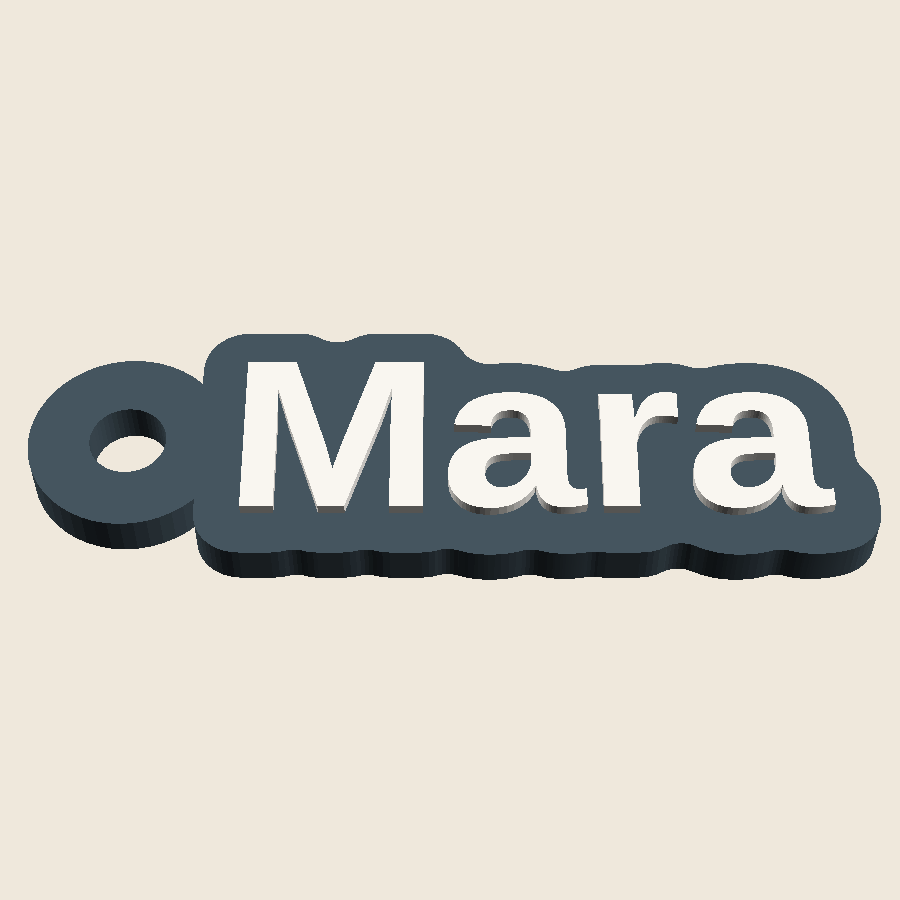
A key tag with your name – the plate follows the letters as a contour, with the eye on the left or on top. Text raised or flush in a second colour, four fonts. As a series: several names on one print plate, e.g. for the whole family or class.
Settings
Text
- first line: default Mara
- second line
- font: default Sans
- text height (0 = automatic): default 0.0
- text: default Raised
- coloured text: default on
- plate colour: default #45555F
- text colour: default #F8F5EF
Sign
- shape: default Contour
- width (0 = from the text): default 0.0
- height (0 = from the text): default 0.0
- thickness: default 3.0
- corner radius: default 3.0
- border around the letters: default 3.0
- frame: default off
Mounting
- mounting: default Key ring
- eye position: default Left
- move the eye along the edge: default 0.0
- eye size: default 13.0
- eye hole: default 5.0
Series
- series: names separated by commas
Step by step
- Name and eye Enter your name – the plate follows the letters. The eye sits on the left or on top. Several tags at once: under “Series” enter the names separated by commas.
- Preview and download “Generate preview” calculates the model again. The 3MF holds the colours – in the slicer you assign a filament to each colour; the STL is single-coloured.
- Help Behind the question mark you find this tour and answers to common questions.
Frequently asked questions
How do I get coloured text?
Switch on “coloured text” and download the 3MF. In the slicer the text gets a second filament – with raised text a filament change at the top of the plate works too.
Does the eye hold on a key ring?
By default the eye is 13 mm wide with a 5 mm hole and joins the plate with a solid bar. You set size and hole yourself (the ring stays at least 2 mm wide), e.g. a larger hole for a carabiner. For heavy key rings set the thickness to 4 mm in “Expert”.
How do I make tags for several people?
Under “Series” enter the names separated by commas, e.g. “Mara, Noah, Lina”. Every name becomes its own tag, all on one print plate (up to 30).
My name is short, the tag looks small.
In “Expert” raise the “text height” – the tag grows with it.