For a birth: initial & stand – guide and settings
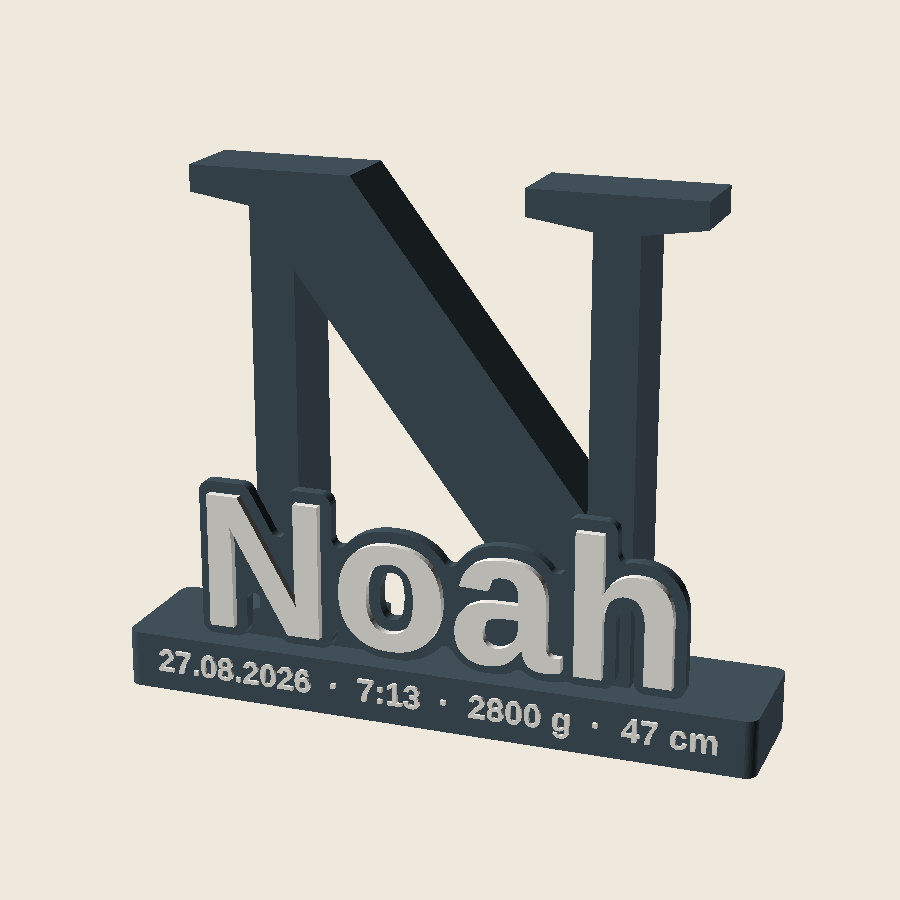
A large standing initial or a motif (moon, cloud, hot air balloon, heart, star) with the name in front of it – as a gift for a birth, a christening or the nursery. Optionally on a plinth with the birth data (date, time, weight, length) on its front. Or as a birth announcement stand: a plate with the name, a heart, a saying and stars, the data on tiles beside it. Name and data in a second colour.
Settings
Form
- form: default Initial
Letter
- letter or motif: default Letter
- letter: default N
- font of the letter: default Serif
- height of the letter or motif: default 120.0
- depth of the letter: default 20.0
Name
- name (empty = none): default Noah
- font of the name: default Sans
- text height of the name (0 = automatic): default 0.0
- how far the name stands out: default 5.0
- name: default Contour
- name and data in their own colour: default on
Base
- base: default Plate
- date of birth
- time
- weight
- length
- text height of the data: default 6.0
Colours
- colour of the letter or plate: default #45555F
- colour of name and data: default #F8F5EF
- colour of the base: default #45555F
- print: default Lying
Saying
- saying, line 1: default Ein bisschen Mama,
- line 2: default ein bisschen Papa
- line 3: default und ganz viel Wunder!
- line 4
- font of the name: default Script
- font of the saying: default Round
Stand
- data tiles: default Left
- size of the tiles (0 = automatic): default 0.0
- heart: default on
- stars: default Corners
- height: default 140.0
- lettering: default Raised
- colour of the tiles: default #F8F5EF
- colour of the data: default #45555F
- foot: default on
- lean (°): default 8.0
- play in the slot: default 0.3
Step by step
- Letter and name Choose the initial and enter the name – it automatically gets about as wide as the letter. If you enter birth data, the model gets a plinth with the data on its front.
- Preview and download “Generate preview” calculates the model again. The 3MF holds the colours – in the slicer you assign a second filament to the name and data; the STL is single-coloured.
- Help Behind the question mark you find this tour and answers to common questions.
Frequently asked questions
Why are Ä, Ö and Ü not available as the initial?
The dots would be loose pieces without a connection to the letter. So the initial can be A to Z or 0 to 9. In the name umlauts are fine: there the contour behind the letters holds the dots.
How is the model printed?
By default lying in parts: letter, name and base lie flat on the bed and are plugged together afterwards – letter and name have a tab at the bottom that goes into a slot of the base. Small ribs in the slots are pressed in a little when you plug the parts together, so everything sits tight and does not wobble; no glue needed. The 3D view shows the model put together, the file holds the parts. Or standing in one piece. Both without supports. Assign a second filament to the name and data in the 3MF, or print it in one colour.
Are my birth data stored?
The data are only used to create the file. Like for every model, the finished file stays in the server cache until newer files push it out; it is not linked to anyone. If you do not want data in the model, simply leave the fields empty.
What is the birth announcement stand?
A second form under “form”: an upright plate with the name, a heart, a saying (up to four lines) and stars, the birth data on tiles beside it – left, right or on both sides. It takes name, data and colours from the initial. You print one flat piece plus a foot, without supports.