Draw and discard pile holder – guide and settings
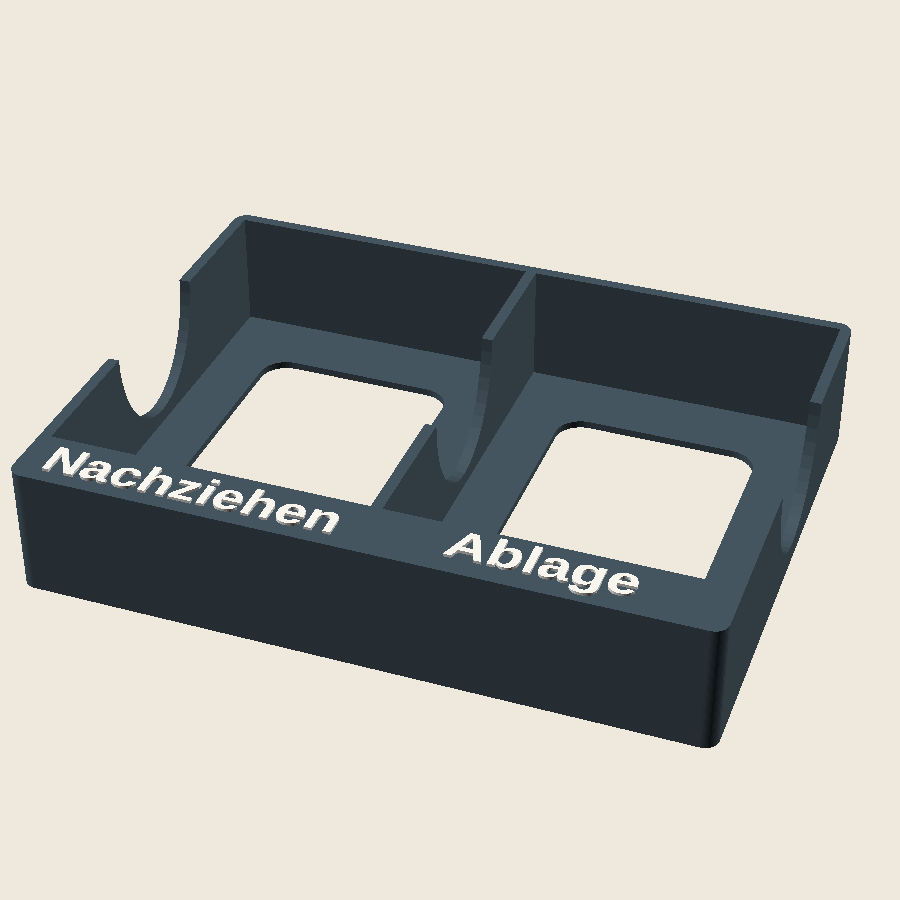
Holder for up to four card piles side by side – draw pile, discard, exile or tokens. The trays fit card format, sleeves and pile height exactly, with finger notches at the sides and a label at the front.
Settings
Cards
- card format: default TCG 63x88
- card width (custom): default 63.0
- card height (custom): default 88.0
- sleeves: default Single
- cards per pile: default 40.0
Trays
- piles: default 2.0
- finger notches: default on
- window in the floor: default on
- room around the cards: default 1.0
- wall: default 2.4
Labels
- label pile 1: default Nachziehen
- label pile 2: default Ablage
- label pile 3
- label pile 4
- coloured text: default on
Step by step
- Cards and piles Card format, sleeves and cards per pile set the size and height of the trays. Then choose how many piles lie side by side and label each tray.
- Preview and download “Generate preview” calculates the model again. The 3MF holds the colours – in the slicer you assign a filament to each colour; the STL is single-coloured.
- Help Behind the question mark you find this tour and answers to common questions.
Frequently asked questions
The cards sit too tight in the tray.
In “Expert” raise the “room around the cards”. Double-sleeved cards need “sleeves: Double”.
What is the window in the floor for?
You push the pile up from below when only a few cards are left. It also saves filament. Switch it off in “Expert”.
Four piles do not fit the print bed.
With sleeves four TCG piles are wider than 256 mm. Print two holders with two piles each.